RAAW

Case studies

Real systems.
Built end to end.

Three projects connecting conversations, business tasks, video publishing, and email into practical workflows.

01 · Featured case study

AI Business Assistant

An AI-powered business assistant that turns conversations into organized business actions. Manage tasks, calendars, and daily operations through WhatsApp or a dedicated dashboard.
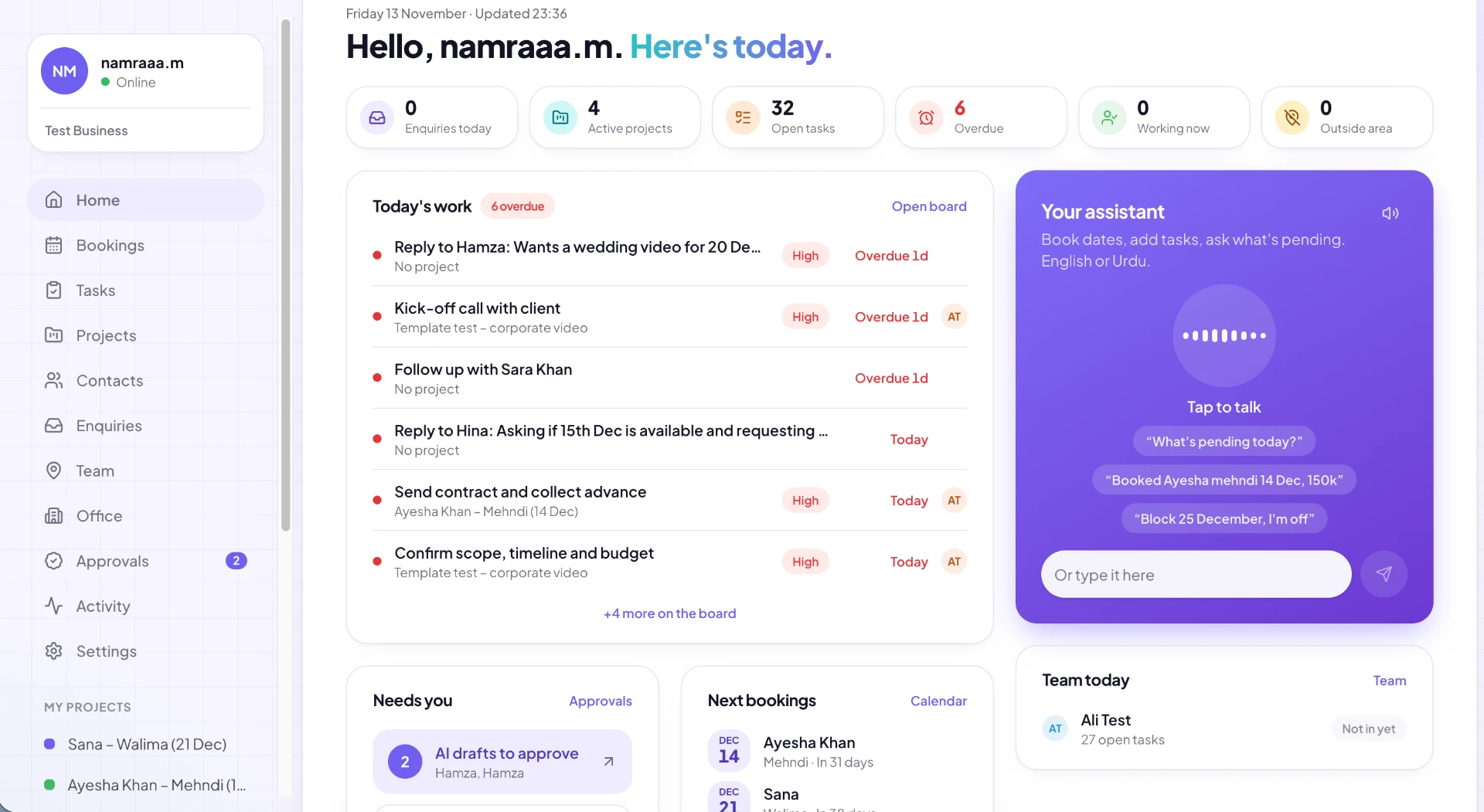
AI business assistant dashboard showing today's tasks, bookings, team status and the AI assistant panel

01 · The problem

Business owners juggle messages, tasks, schedules, and multiple tools. Important things get buried in conversations, and manually organizing everything takes time.

02 · The system

It connects an AI assistant to business management tools, allowing users to communicate naturally and turn requests into actionable updates.

03 · What it actually does

  • WhatsApp AI assistant

    Chat with the assistant and give it instructions.

  • Task management

    Automatically create and update to-do items.

  • Calendar management

    Create and manage calendar events.

  • Interactive dashboard

    Chat with the assistant and manage business activity from one place.

  • Connected experience

    Keep conversations and business organization in one system.

How it works

  1. 01

    User interaction

    WhatsApp or dashboard

  2. 02

    AI assistant

    Understands requests and determines actions

  3. 03

    Tasks + Calendar

    Create, update and manage

  4. 04

    Updated workspace

    Business stays organized

04 · Tech stack

SupabaseChatGPTLovablen8n

05 · Explore the project

Explore live preview
02 · Case study

YouTube Upload Automation

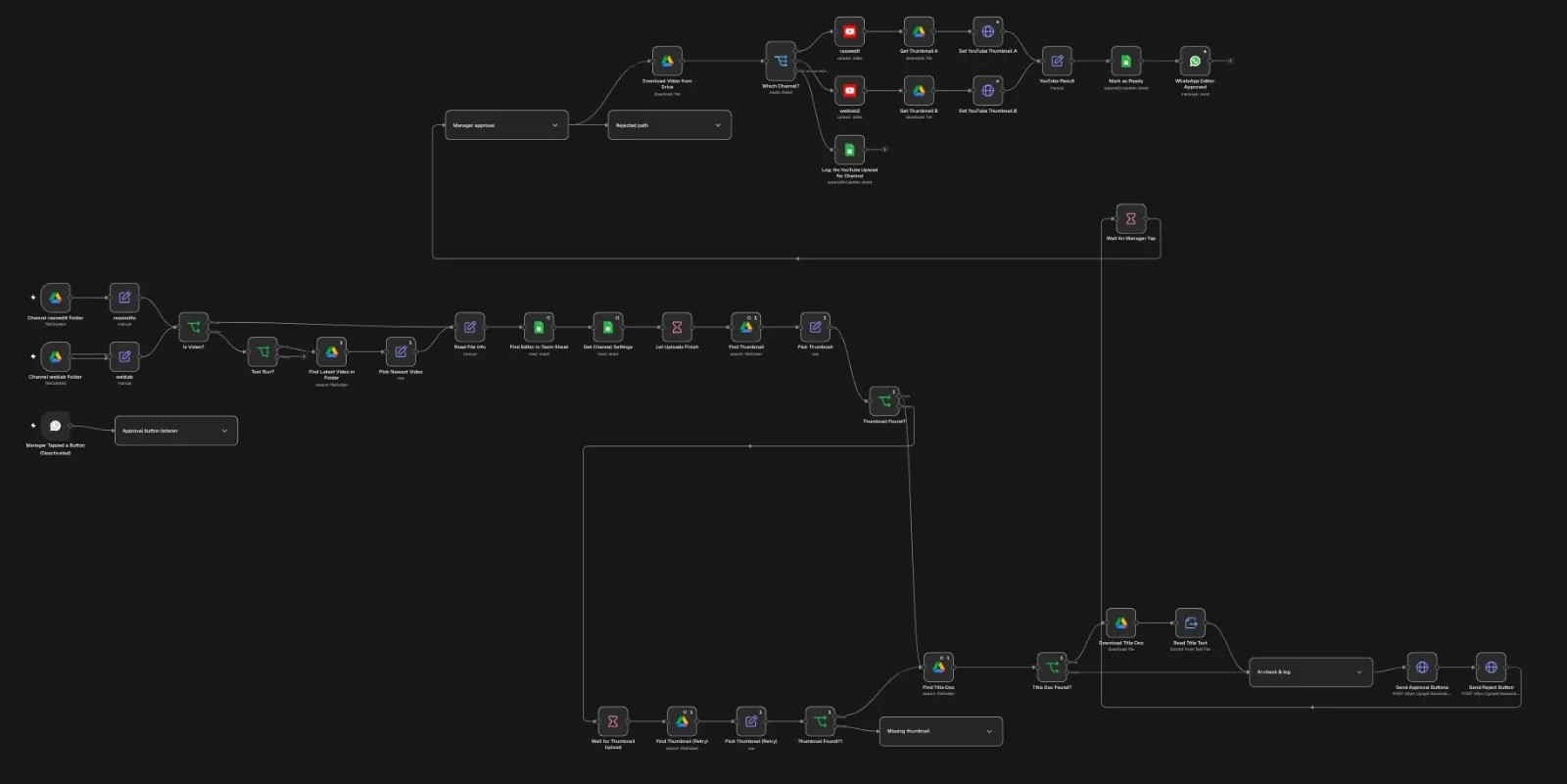
A streamlined YouTube publishing workflow that takes videos from Google Drive, generates metadata with AI, collects approval through WhatsApp, and publishes approved content to YouTube.

Actual n8n workflow canvas connecting video files, processing steps, and WhatsApp approval

01 · The problem

Publishing videos involves repetitive steps: locating files, writing metadata, getting approval, and manually uploading content. This creates unnecessary work and delays.

02 · The system

An automated workflow that connects Google Drive, AI, WhatsApp, and YouTube into one publishing pipeline.

03 · What it actually does

  • Video detection

    Detect new videos in Google Drive.

  • AI metadata

    Generate a title and description for the video.

  • WhatsApp approval

    Collect review and approval before publishing.

  • YouTube publishing

    Upload the approved video to YouTube.

How it works

  1. 01

    Google Drive

    New video detected

  2. 02

    AI metadata generation

    Title and description created

  3. 03

    WhatsApp approval

    Review and approve the content

  4. 04

    YouTube

    Approved video uploaded

04 · Tech stack

n8n

The outcome

  • Less manual work during publishing
  • AI-assisted metadata generation
  • Approval before publishing
  • A connected workflow from file submission to upload

05 · Explore the project

Explore workflow screenshot

03 · Case study

AI Receptionist

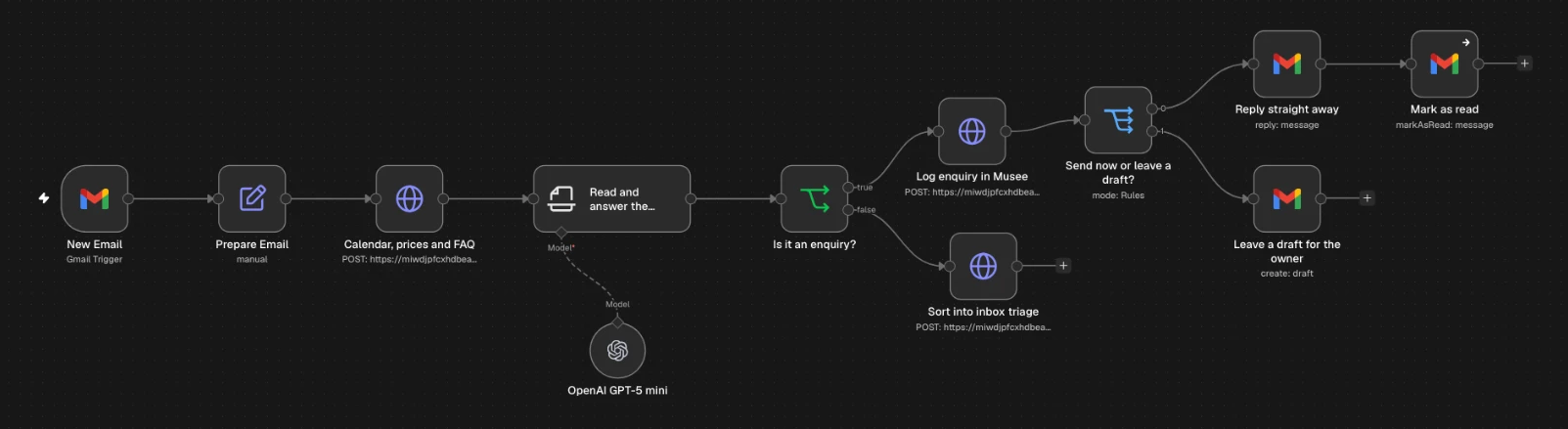
An AI email receptionist that checks your schedule and business database, replies with relevant answers, and emails you when a topic needs sensitive handling.

AI email receptionist workflow with incoming email, calendar and business information lookup, AI reasoning, replies, and owner review

01 · The problem

Answering incoming emails means checking your schedule and business information, while deciding which topics need your personal attention.

02 · The system

An AI receptionist reads incoming email, checks your schedule and database for context, and handles routine replies while bringing sensitive topics to you by email.

03 · What it actually does

  • Automatic email replies

    Answer routine incoming emails with relevant information.

  • Schedule checks

    Check your schedule before answering availability questions.

  • Business context

    Look up business information in your database to inform the answer.

  • Sensitive-topic alerts

    Email you when a topic needs your personal attention.

How it works

  1. 01

    Incoming email

    Read the message and identify the request

  2. 02

    Check context

    Consult the schedule and business database

  3. 03

    AI response

    Prepare a relevant answer

  4. 04

    Reply or escalate

    Reply to routine requests; email the owner for sensitive topics

04 · Tech stack

n8nGmailOpenAI

05 · Explore the project

Explore workflow screenshot